















CHAPTER 01 / BEFORE YOU BEGIN
Prepare your materials. Define the deliverables.
Business owners, sales, marketing teams, and designers need to agree on customer experience priorities.
Starting materials
- Customer conversations or interviews
- Examples of successful and unsuitable inquiries
- The main page that visitors go through
What you will prepare
Journey map with questions, obstacles, evidence, and next steps.
Use it as material for decisions and discussions, then adjust the work limits to your conditions.
Starting from one page, one process, or one most important need. Note unknowns as questions; Don't force answers just to make the worksheet look finished.
CHAPTER 02 / WORK STEPS
Work in a clear order.
Select one decision and one group of buyers
Don't map all customers at once. Choose a real context, for example procurement looking for vendors for certain needs. Write down search triggers, consenting parties, and information to bring to the meeting. Separate customer conversation findings from team guesses, so design decisions can be tested.
Map tasks, not just screens
The visitor may come from a search, read the specifications, examine the evidence, then file the information for his or her superiors before contact. For each stage, write down the tasks and unanswered questions. Don't force everyone to follow the same funnel; provide an entrance that suits your needs.
Pair resistance with change
If people don't find the scope of the service, clarify the structure and labels, not just the button color. If the form asks for too much information, determine what is truly necessary for an initial response. Use understandable input labels, explanations, and error messages. Changes must have a task-related reason.
Observe tasks and link to follow-up
Ask potential users to search for one piece of information without direction. Note any misclicks, confusion, and passages they need to re-read. Continue by seeing whether the inquiry has the context that sales needs. Compare before and after conditions over a reasonable period; Don't conclude the cause from changes in traffic alone.
CHAPTER 03 / EXAMPLE SURGERY
Connect steps to real decisions.
In an IT services vendor exercise, the buyer needs to understand the fit before requesting a proposal. This map helps select page content, rather than assuming every visitor is ready to buy.
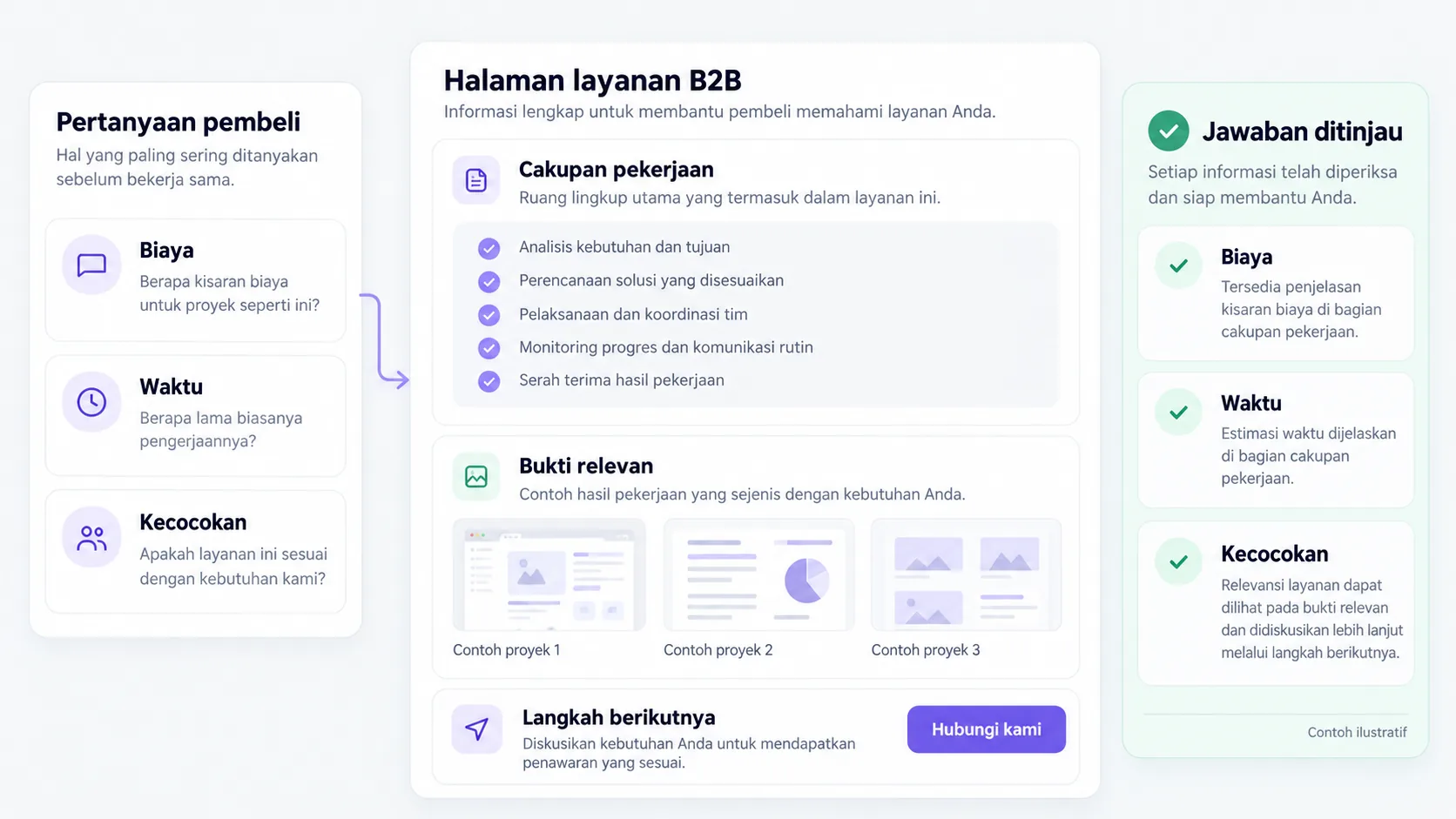
| Stage | Questions/obstacles | Helpful elements |
|---|---|---|
| Recognize needs | Will my problem be addressed? | Examples of issues and scope |
| Assess suitability | What are the prerequisites and limits? | Requirements and processes |
| Checking evidence | Is there a similar job? | Case studies with context |
| Start a discussion | What should I prepare? | Short form and instructions |
Replace the example lines with your business conditions. Mark information that already has evidence, that is still an assumption, and that needs to be asked of the person in charge.
CHAPTER 04 / REVIEW POINT
Avoid decisions that seem right, but have not been tested.
Thinking the new design is definitely more effective
Check task completion and inquiry quality, not just internal visual preferences.
Removes all navigation options
Buyers need access to evidence, conditions, or other information that supports the decision.
If a decision impacts costs, access, data, or other teams' work, list the parties who need to approve it. Explain the evidence that is available and the extent of information that remains to be examined.
CHAPTER 05 / WORKBOOK
Make your plans here.
Fill in concisely and specifically. For information that is not yet available, write who needs to be asked for confirmation. These notes are not sent by the Playbook feature to Oura; download before the tab closes.
Do not enter passwords, access tokens, or personal customer data. Temporary storage follows the browser tab session, not the Oura account.
CHAPTER 06 / BEFORE SUBMISSION
Check your job readiness.
This checklist records the tasks you marked. It is not an audit score, certification, or automatic assessment of a website.
Frequently asked questions
Do you have to do a lot of research?
Start from existing conversations and some task testing. Note the limitations of the sample.
What is the role of analytics?
Analytics help show patterns of action; conversations and observations help explain why barriers occur.
Referral & usage limits
References checked on October 2, 2026. Steps, examples and worksheets are Oura editorial formulation with the help of AI and public references. Examples are not client results. The guide does not guarantee business results and does not replace a dedicated examination of your systems.